
From Manual Review to AI-Assisted Matching
I integrated an existing AI-assisted patient matching solution into a complex electronic medical record (EMR) document indexing workflow. Staff can review AI-suggested patient matches and document splits while retaining the flexibility to work manually, with the goal of reducing repetitive tasks and indexing time.
Reusing existing AI technology to accelerate delivery
The business wanted to introduce AI-assisted patient matching quickly by reusing technology developed for another EMR product within the company.
The goals were to:
Leverage existing technology to accelerate delivery.
Keep manual indexing available.
Adapt the experience to our EMR's established design patterns.
Understanding how AI could fit into the existing workflow
I started by evaluating the existing AI solution and our EMR's document indexing workflow to understand how the two could work together.
Reviewed the existing AI solution to understand its capabilities and functionality.
Mapped the current indexing workflow with the product team to identify where AI assistance could be introduced.
Identified workflow differences and additional complexities around document splitting and patient matching that needed to be addressed.
Designing around AI limitations
Working with product and engineering, I navigated technical constraints while preserving user flexibility and making AI limitations clear.
Working around a document-splitting limitation
Manually splitting a document disabled AI assistance. I advocated for a more flexible approach, but the limitation had to remain for the initial release.
My design response:
- Added a warning before users proceeded with manual splitting.
- Provided a reset option to restore AI assistance.
Open document
AI assistance available
Choose to split
Manual splitting selected
Confirm impact
AI assistance will be disabled
Index manually
AI assistance unavailable
Accommodating AI processing limitations
The existing technology had a 50-page limit per document, and processing times varied with upload volume.
My design response:
- Set expectations: Added a warning about the page limit during upload.
- Communicated status: Used familiar icons and tooltips in the batch-upload list.
- Explained availability: Added contextual messages when AI assistance was unavailable.
Upload documents
Add files to a batch
Page-limit notice
Explain the 50-page AI limit
Batch created
Documents ready for indexing
Batch list
Show AI availability status
Open document
Explain why AI is unavailable
Integrating AI assistance into document indexing
I adapted the existing AI experience to our EMR's more complex document indexing workflow, adding support for manual processes and clearer processing feedback.
Processing feedback
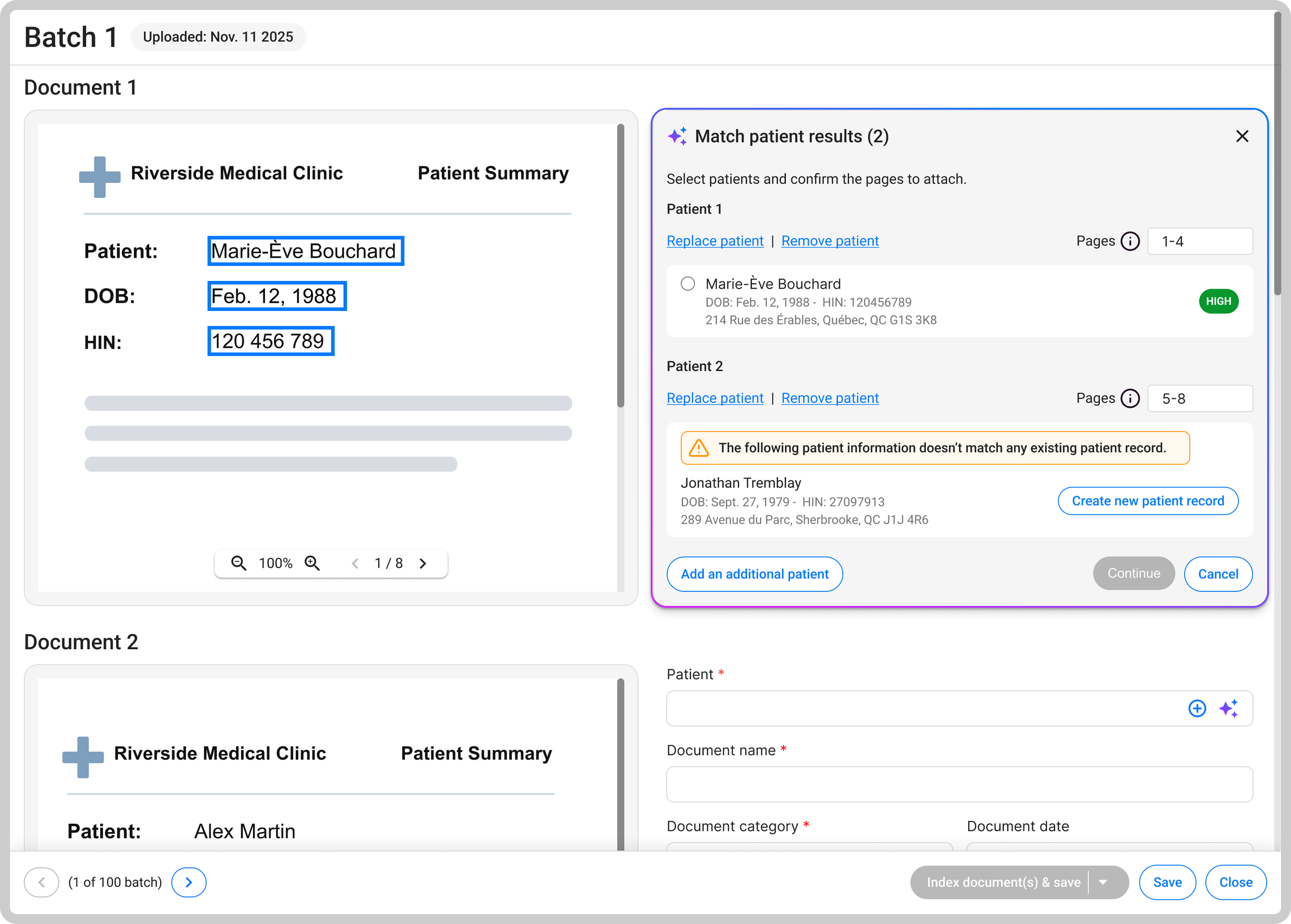
I designed status indicators, tooltips and contextual messages to communicate AI processing progress, availability and limitations, helping staff understand when documents were ready for indexing.
AI-assisted patient matching
Staff could review and adjust suggested patient matches and document splits, with AI assistance integrated directly into the patient selection field.
Keeping manual indexing available
Staff could choose AI assistance or continue indexing manually. They retained the ability to review and adjust suggested matches and document splits, or complete those tasks manually when needed.
Reducing manual effort while keeping staff in control
The feature was still in development when I left, so post-launch results weren't available.
- Reduce indexing time: Minimize manual effort spent reviewing documents, matching patients and splitting pages.
- Reduce assignment errors: Help staff identify potential patient matches while retaining control over final assignments.
Reflection
This project reinforced the importance of designing AI experiences that feel transparent and trustworthy, especially in healthcare where accuracy and user control are critical. It also reflects my ability to adapt emerging technology to complex, data-sensitive workflows while balancing user needs with technical constraints.
Back to top ↑